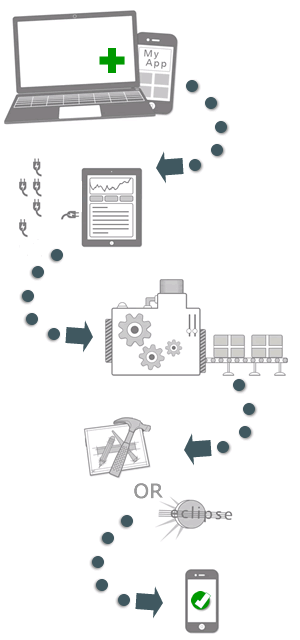
1) Create an application
Start experimenting by creating an app using BtCentral at buzztouch.com. Don't worry about the details yet,
just name your app then "Save."
2) Organize ideas into individual screens
Continue using BtCentral to eplore and organize individual screens
and menus. This involves selecting and configuring plugins.
Again, don't worry about the details yet.
3) Download your project's source code
When you're done experimenting with some plugins, use BtCentral to prepare your application's source
code for download.
4) Open the downloaded project
Use Xcode for
iOS
or Eclipse for
Android to open the project after you
download it to your computer. These are free software packages provided by Apple and Google.
5) Compile the source code
This is done using Xcode (iOS) or Eclipse (Android) and identifies you as the developer, it's your
creation after all. The result is a native app. Probably a simple app, no worries, you're just getting
started.
6) Launch the app
Launch the app in the iOS simulator, the Android Emulator, or an actual device. Tinker with some settings
BtCentral to see the results of your changes on the device.
7) Continue learning, make something worthwhile
For most new developers, creating something interesting and useful gets challenging. This is OK, anything
worth making should be challenging, right? Join some discussions in the
forums, or explore some source code, it's all
part of the game.